
Check a Lightning Invoice
Step-by-step Reflex workflow to screen a Lightning Invoice for compliance and risk signals before settlement.
This guide walks you through running a workflow to check a Lightning Invoice for compliance and risk issues.
You need to have an API key for this tutorial. Check how to authenticate your API calls here.
Template
Reflex provides a template for running checks against an invoice.
Template ID: 3ab8f82c-6060-4332-91b6-d6ada8f5332dCustom templates are only available to enterprise users. Please reach out if you need access to custom templating features.
Running the workflow
For this workflow we are going to be running checks against the following invoice, passing a webhook URL to get notified of the result of the workflow and an email address to get the workflow report if it fails.
Invoice: lnbc1500u1pn668g9pp5d4mgwnmzmwzzq2jxus3v7g9jhwln52rvsv7dxrn6rmunden7hxasdqqcqzzsxqyz5vqsp5aegsttsfar2xf8cfctn6lne3dquvfq4cp28h80flep4d4d8kceyq9p4gqqqqqqqqqqqqqqqqqqqqqqqqqqqqqqqqqqqqqqqqqqqqqqpqysgqdxz6k8634nshccx8ckrykrnlf5aktrekhnqm4dyr69rzwhvx08gxw5svm9uq8agt6y3dpq5sv56v8cxfpkvp258pjgg33p589dxsvpgqszs4yhSend the mutation
Call the workflows.runs.create mutation with the template ID and the target payment request.
mutation Create($input: WorkflowRunInput!) {
  workflows {
    runs {
      create(input: $input) {
        workflow_run_id
      }
    }
  }
}
Variables:
{
  "input": {
    "template_id": "3ab8f82c-6060-4332-91b6-d6ada8f5332d",
    "webhook_url": "https://webhookendpoint.com",
    "workflow_input": [
      {
        "name": "PAYMENT_REQUEST",
        "value": "lnbc1500u1pn668g9pp5d4mgwnmzmwzzq2jxus3v7g9jhwln52rvsv7dxrn6rmunden7hxasdqqcqzzsxqyz5vqsp5aegsttsfar2xf8cfctn6lne3dquvfq4cp28h80flep4d4d8kceyq9p4gqqqqqqqqqqqqqqqqqqqqqqqqqqqqqqqqqqqqqqqqqqqqqqpqysgqdxz6k8634nshccx8ckrykrnlf5aktrekhnqm4dyr69rzwhvx08gxw5svm9uq8agt6y3dpq5sv56v8cxfpkvp258pjgg33p589dxsvpgqszs4yh"
      }
    ],
    "notification_settings": {
      "emails": [
        {
          "email": "[email protected]"
        }
      ],
      "trigger": {
        "type": "STATUS",
        "status": "FAILURE"
      }
    }
  }
}
Receive the workflow_run_id
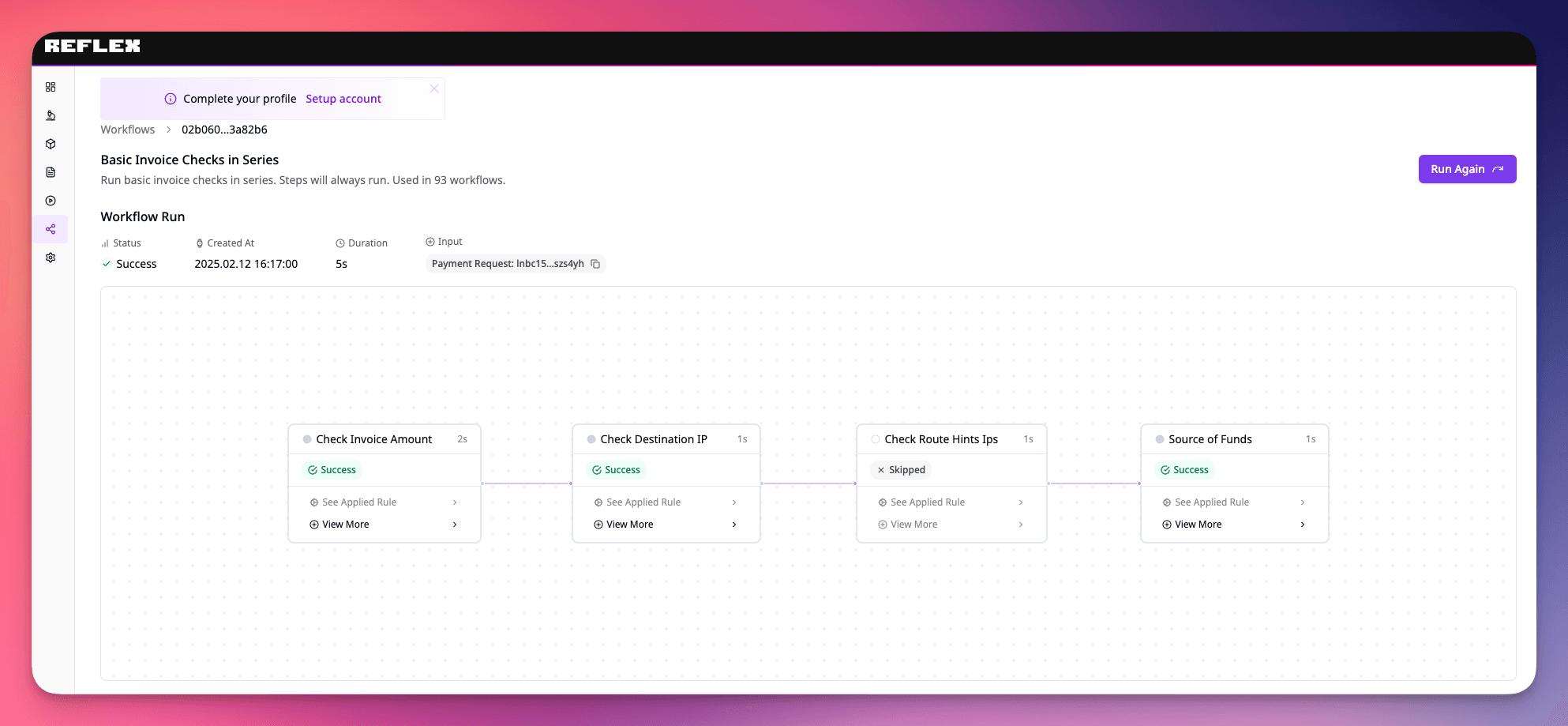
Once started, you'll receive a workflow_run_id. Use it to query additional information about the run.
{
  "data": {
    "workflows": {
      "runs": {
        "create": {
          "workflow_run_id": "02b060cc-fc05-485d-8ebc-926ec13a82b6"
        }
      }
    }
  }
}
Check a Lightning Node
Step-by-step Reflex workflow to screen a Lightning Node for compliance, sanctions, and risk indicators across peers and channels.
Check a Lightning Address
Step-by-step Reflex workflow to screen a Lightning Address for compliance, sanctions, and risk indicators before transacting.