
Third Party Hosted
Connect your own LND or Litd node to Rails Yield — Amboss runs liquidity automation against the node you already operate.
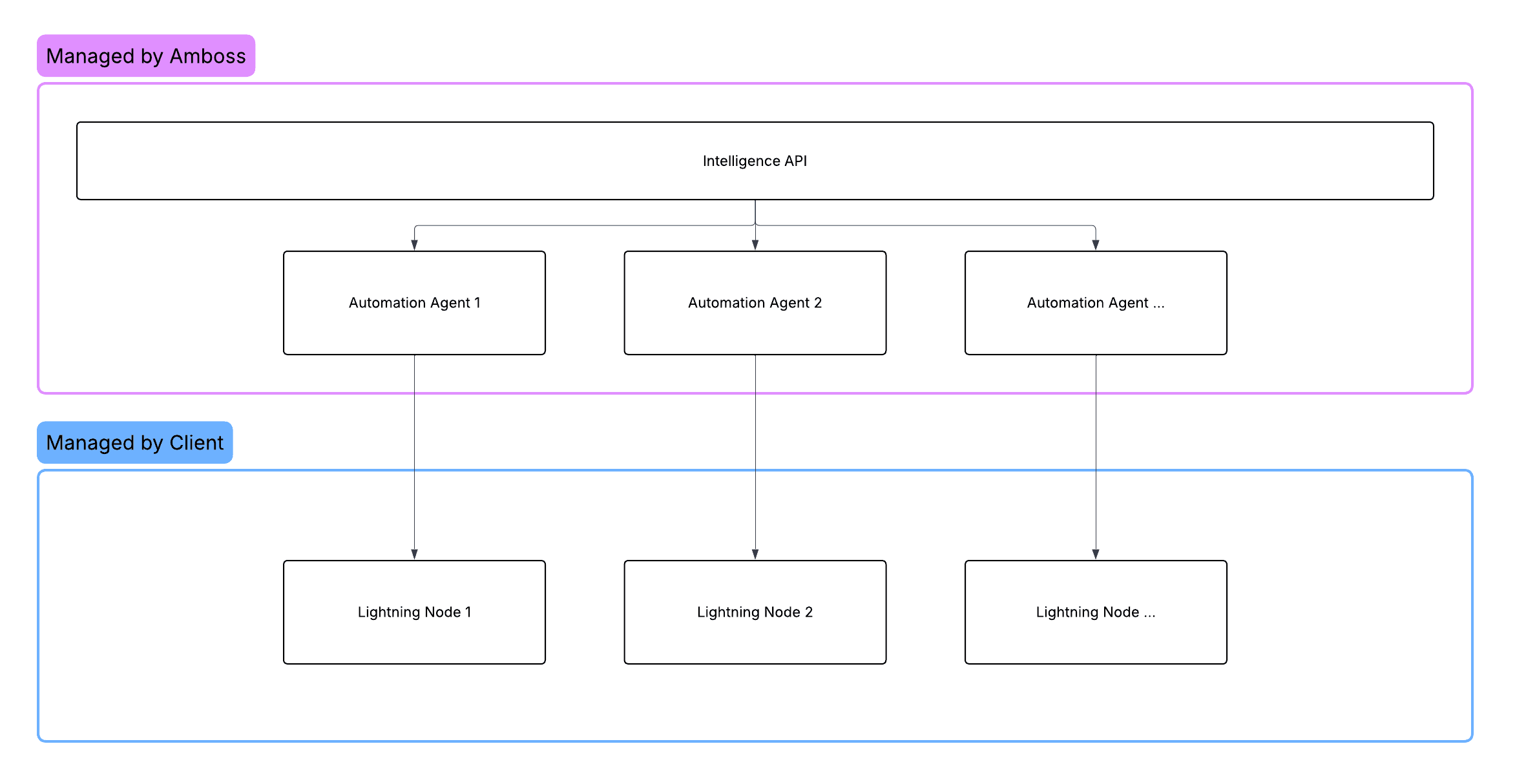
Third Party Hosted lets teams that already run Lightning infrastructure benefit from Rails liquidity automation without migrating their daemon. You keep operating LND (or Litd for Taproot Assets), submit a scoped management macaroon through the dashboard, and Amboss connects in to open/close channels, set fee policy, and list liquidity on Magma.
Connecting a node is a dashboard flow because the management macaroon is encrypted with your team's symmetric key client-side before it reaches the server. The node.connect mutation cannot accept a plaintext macaroon. See Deploy a Node for the full client-side crypto story.
When to choose Third Party Hosted
- You already operate an LND or Litd node in production.
- You want to keep control over node-level operations (peering, daemon versions, backups).
- You're willing to expose a gRPC/REST endpoint inbound from Amboss.
- You don't have engineering capacity for in-house liquidity automation.
Architecture
The macaroon is encrypted with your account password before transmission. Amboss decrypts at use time and never persists it in cleartext.
Prerequisites
- A running LND or Litd node reachable from the public internet (the gRPC/REST endpoints don't have to be publicly resolvable - a Tor onion service or VPN works as long as Amboss can reach them).
- A management macaroon with the permissions listed in Permissions.
- TLS configured on the node (self-signed is fine; you'll submit the cert).
- Sufficient on-chain Bitcoin in the node's wallet to fund channels.
Setup
Mint a management macaroon
Use lncli or litcli to bake a macaroon scoped to the permissions Rails requires.
For LND:
lncli bakemacaroon \
  info:read peers:read peers:write \
  onchain:read offchain:read offchain:write \
  invoices:read invoices:write \
  --save_to=rails-management.macaroon
For Litd (when enabling Taproot Assets), add:
litcli bakesupermacaroon \
  --permissions="uri:/litrpc.Session/AddSession,uri:/looprpc.SwapClient/..."
Then hex-encode it:
xxd -p -c 1000 rails-management.macaroonRails verifies the macaroon's permissions before accepting it. Missing permissions will surface as Macaroon does not have the required permissions from node.connect.
Submit credentials in the dashboard
Open app.amboss.tech, choose Third Party Hosted, and paste the gRPC host, REST URL, TLS cert (if self-signed), and hex-encoded macaroon into the connection form. The browser encrypts the macaroon with your team's symmetric key before calling node.connect and provisioning the Rails-side watcher.
For reference, the underlying mutation is:
mutation Connect($input: NodeConnectInput!) {
  node {
    connect(input: $input) {
      node_id
      success
    }
  }
}
with NodeConnectInput accepting either an lnd or litd block of { rest, grpc, tls_cert, management_macaroon[, taproot_assets] }. Calling it from a backend with a plaintext macaroon will not produce a working integration - the encrypted-credential storage step that follows would fail.
Confirm the node sees Bitcoin
If your node already has on-chain or channel funds, Rails will detect them and advance the state. If not, the node will sit at WAITING_FOR_DEPOSIT until the first balance appears.
query State($nodeId: String!) {
  node {
    deployed_node(node_id: $nodeId) {
      state
      pubkey
      sockets { lnd { rest grpc } }
    }
  }
}
Activate
Same as Fully Managed - click "Activate" in the dashboard and complete the Stripe checkout if prompted. After activation the node flips to ACTIVE and Amboss begins driving liquidity.
Optional: enable Taproot Assets
For Litd-connected nodes, call node.asset.enable_taproot_assets. See Assets.
Updating sockets
If you migrate the daemon to a new host, update the sockets without re-doing the macaroon by calling node.asset.enable_taproot_assets (which accepts new rest/grpc), or by re-running node.connect with the new credentials.
Networking
Amboss needs inbound connectivity to the node's gRPC port (default 10009) and REST port (default 8080). Common topologies:
| Topology | Notes |
|---|---|
| Public IP + TLS | Simplest. Use Cloud Armor or equivalent if you want allowlisting. |
| Tor onion service | Supported. Submit the .onion host in grpc / rest. |
| Site-to-site VPN | Supported. Coordinate with your Amboss contact for static egress IPs. |
Permissions submitted
Rails uses the management macaroon only for the operations it advertises. The macaroon you submit should grant exactly the Required permissions, nothing more. A macaroon with spend permissions will not be rejected, but the additional scope is never exercised.
Trade-offs
| Pro | Con |
|---|---|
| Keep your existing LND/Litd deployment | DevOps responsibility (uptime, upgrades, backups) stays with you |
| Lowest possible attack surface for self-hosted teams | Requires inbound connectivity to your node |
| Drop-in Taproot Assets automation when Litd-connected | Your daemon's downtime directly affects yield |
Next steps
Fully Managed
Rails Yield with Amboss running the Lightning node and the automation — fastest path to deployed Bitcoin yield with no DevOps overhead.
Intelligence API
Run your own Lightning node and automation, and use Amboss insights to drive channel and routing decisions — no inbound connection from Amboss to your node.