
Monitor Earnings
Track Rails Yield node performance — balances, routing and liquidity revenue, charts, and transaction history — via the dashboard and the GraphQL API.
Every metric shown in the Rails dashboard is also available through GraphQL. This page maps the dashboard view to the queries that power it, so you can build your own monitoring on top.
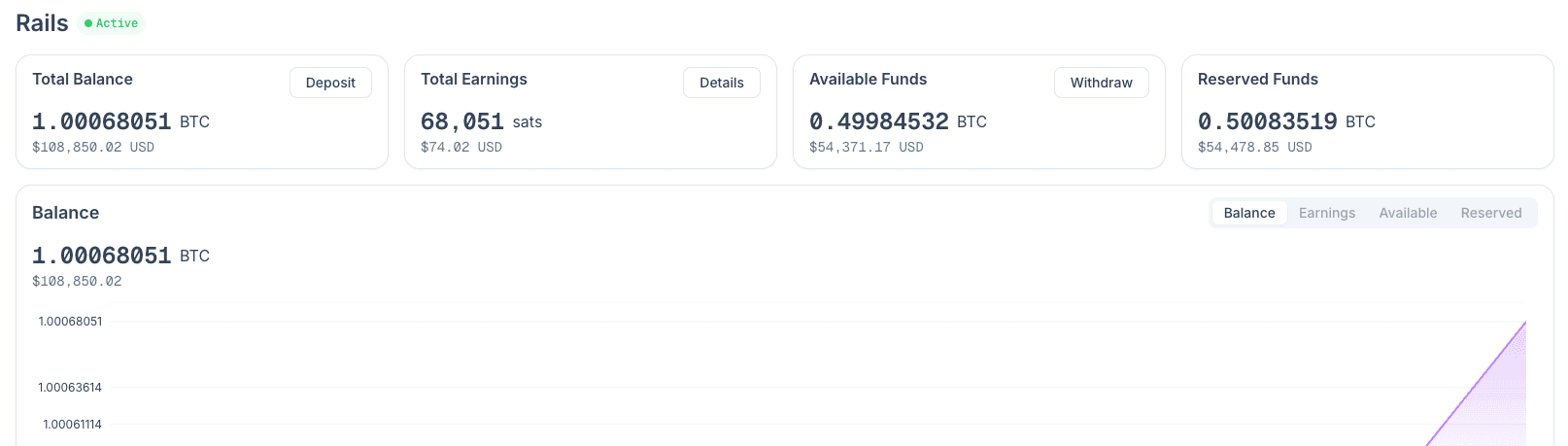
Key metrics
| Metric | Dashboard label | GraphQL |
|---|---|---|
| Total Bitcoin | "Total Funds" | liquidity_provider.funds.total.sats |
| Lifetime earnings | "Total Earnings" | liquidity_provider.funds.earnings.sats |
| Available to withdraw | "Available Funds" | liquidity_provider.funds.available.sats |
| Locked in channels | "Reserved Funds" | liquidity_provider.funds.reserved.sats |
| Routing revenue | Revenue chart | liquidity_provider.revenue.routing.sats |
| Liquidity revenue | Revenue chart | liquidity_provider.revenue.liquidity.sats |
Funds snapshot
The single live snapshot that drives the four headline cards:
query Funds($input: LiquidityProviderInput) {
  user {
    liquidity_provider(input: $input) {
      node_id
      funds {
        total     { sats usd }
        available { sats usd }
        reserved  { sats usd }
        earnings  { sats usd }
      }
    }
  }
}
curl -X POST https://app.amboss.tech/graphql \
-H "Content-Type: application/json" \
-H "Authorization: Bearer $AMBOSS_DASHBOARD_TOKEN" \
-d '{
"query": "query($input: LiquidityProviderInput) { user { liquidity_provider(input: $input) { funds { total { sats usd } available { sats usd } reserved { sats usd } earnings { sats usd } } } } }",
"variables": { "input": { "node_id": "<NODE_ID>" } }
}'const { user } = await client.request(FUNDS, {
input: { node_id: process.env.NODE_ID },
});
const { total, available, reserved, earnings } = user.liquidity_provider.funds;
console.log(`Total: ${total.sats} sats ($${total.usd})`);
console.log(`Earnings: ${earnings.sats} sats ($${earnings.usd})`);Charts
Both the balance and revenue chart bucket the data by an AggregateInterval (WEEK, MONTH, or YEAR) chosen from the size of the from/to window — see Liquidity API.
Balance over time
query BalanceChart($input: LiquidityProviderInput) {
  user {
    liquidity_provider(input: $input) {
      charts {
        balance {
          interval
          chart { period balance { sats usd } }
        }
      }
    }
  }
}
Revenue over time
query RevenueChart($input: LiquidityProviderInput) {
  user {
    liquidity_provider(input: $input) {
      charts {
        revenue {
          interval
          chart {
            period
            routing   { sats usd }
            liquidity { sats usd }
          }
        }
      }
    }
  }
}
Transaction history
Paginated, filterable by type — useful for reconciling routing fees against on-chain deposit/withdraw activity.
query Transactions(
  $liquidityProviderInput: LiquidityProviderInput
  $transactionInput: TransactionInput
) {
  user {
    liquidity_provider(input: $liquidityProviderInput) {
      transaction_list(input: $transactionInput) {
        total_count
        list {
          id
          type
          status
          confirmed
          date
          amount { sats usd }
          fee    { sats usd }
          metadata { type amount_routed { sats usd } }
        }
      }
    }
  }
}
Filter to routing-only revenue:
{
  "liquidityProviderInput": { "node_id": "<NODE_ID>" },
  "transactionInput": { "tx_types": ["ROUTING"], "page": { "limit": 100, "offset": 0 } }
}
Build a monitoring loop
A minimal "earnings ticker" that polls every five minutes and logs the deltas:
import { GraphQLClient, gql } from "graphql-request";

const client = new GraphQLClient("https://app.amboss.tech/graphql", {
  headers: { authorization: `Bearer ${process.env.AMBOSS_DASHBOARD_TOKEN}` },
});

const FUNDS = gql`
  query Funds($input: LiquidityProviderInput) {
    user {
      liquidity_provider(input: $input) {
        funds {
          total    { sats usd }
          earnings { sats usd }
        }
      }
    }
  }
`;

let previous = 0n;

setInterval(async () => {
  const { user } = await client.request(FUNDS, {
    input: { node_id: process.env.NODE_ID },
  });
  const earningsSats = BigInt(user.liquidity_provider.funds.earnings.sats);
  const delta = earningsSats - previous;
  console.log(new Date().toISOString(), "earnings:", earningsSats, "delta:", delta);
  previous = earningsSats;
}, 5 * 60 * 1000);
sats is a string to preserve precision for amounts above 2^53. Parse with BigInt if you intend to do arithmetic across long horizons.
Direct Connection
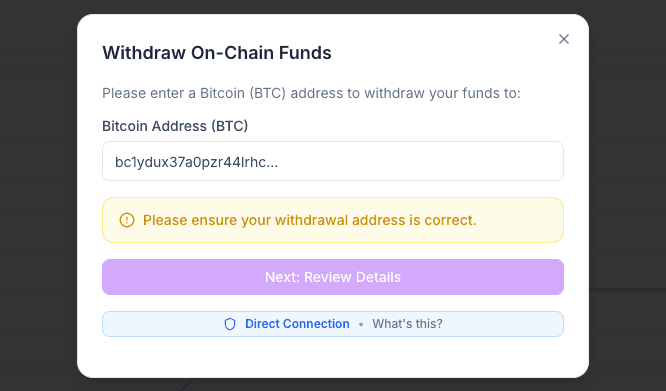
The Direct Connection badge in the dashboard indicates a query is being served directly from your node (via the LND macaroon) instead of from Rails' cached snapshots. Latency is higher but freshness is immediate. The same data is reachable programmatically via the LND API - fetch the macaroon, then call GetInfo, ListChannels, or ForwardingHistory directly.
Next steps
- Liquidity API - full field reference
- Yield Sources - what drives routing vs liquidity revenue
- Withdraw - turn earnings back into on-chain Bitcoin
Deploy a Node
Why Rails Yield node deployment runs in the dashboard — the client-side cryptography it depends on — and where the API takes over once a node is active.
Withdraw Funds
Initiate a Rails Yield withdrawal — set a withdrawal target, derive the master-account password hash, and track funds becoming available as channels unwind.