
Fully Managed
Rails Yield with Amboss running the Lightning node and the automation — fastest path to deployed Bitcoin yield with no DevOps overhead.
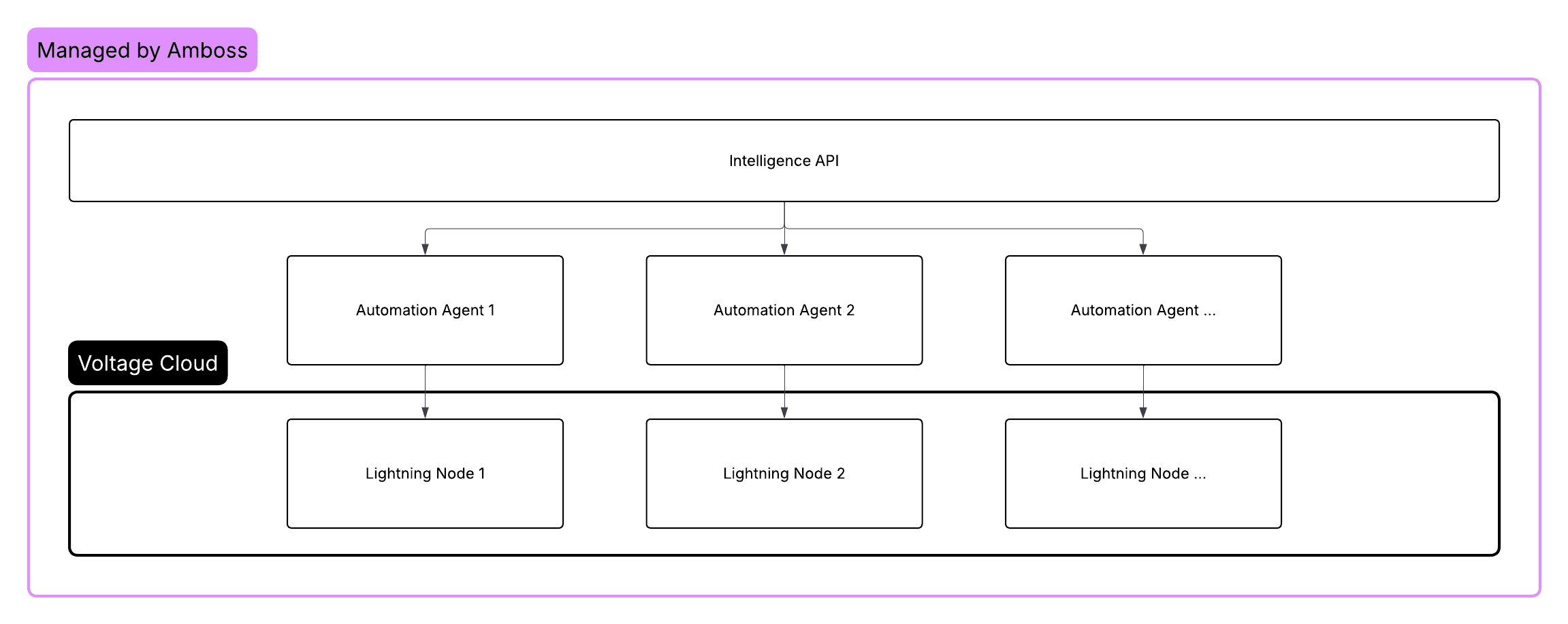
Fully Managed is the default Rails Yield setup. Amboss provisions a dedicated Lightning node in your name on Amboss infrastructure, holds the scoped macaroon needed to manage channels, and runs all liquidity automation. You retain custody of the channel keys (encrypted client-side using your account password) and the on-chain wallet.
When to choose Fully Managed
- You want yield on Bitcoin without operating a Lightning node.
- You don't have an existing LND deployment, or don't want to add one to your stack.
- You're comfortable with Amboss running the underlying node host.
- You prefer a hands-off setup with predictable performance.
Architecture
You hold the channel keys. Amboss never sees them in cleartext. The macaroon is scoped to view, channel management, and fee policy - it cannot move funds off the node.
Setup
Create an account
Sign up at app.amboss.tech and create a master account.
Set an account password
The password becomes the entropy that encrypts the channel keys client-side. See Security for the full key model.
There is no password recovery. Use a password manager and back it up.
Deploy a node
Use the dashboard "Create Earn Node" flow. Deployment depends on browser-side cryptography (decrypting the team symmetric key, baking macaroons against the freshly provisioned node, encrypting them with the symmetric key, and storing them) that has to run in the same session that holds the master password. See Deploy a Node for the full sequence.
Once the dashboard finishes its credential handshake, the node will advance through CREATED → WAITING_FOR_CREDENTIALS → WAITING_FOR_DEPOSIT. You can poll node.deployed_nodes from a backend if you want to observe progress.
Fund the node
Generate an on-chain deposit address (dashboard's "Deposit" panel, or via the LND macaroon as shown in LND API) and send Bitcoin to it. After one confirmation the node advances to WAITING_FOR_ACTIVATION.
Activate
Click "Activate" in the dashboard and complete the Stripe checkout. After Stripe posts back to Rails, the node flips to ACTIVE and automation begins. Team accounts and non-mainnet networks skip the checkout step.
Monitor and withdraw
Use the Monitor and Withdraw docs to manage the node going forward. The same GraphQL queries power both the dashboard and any custom integration you build.
Permissions granted to Amboss
| Permission | Why |
|---|---|
| View peers, channels, info, invoices | Monitor routing throughput and channel health. |
| Open and close channels | Maintain a productive set of routing partners. |
| Set channel routing fees | Optimize for utilization vs revenue. |
| Create invoices | Magma marketplace channel sales. |
Not granted:
- On-chain spend
- Arbitrary invoice payment
- Address generation
See Setup overview → Permissions for the full matrix.
Trade-offs
| Pro | Con |
|---|---|
| Fastest path to yield - hours, not weeks | Opinionated stack (Amboss hosting + Amboss automation) |
| No DevOps requirement | Less control over node alias, peering, or daemon version |
| Same self-custody story as Third Party Hosted | Subscription includes hosting fee on top of yield fee |
Next steps
- Deploy a Node - the API path through the same flow
- Node Lifecycle - state-by-state reference
- Third Party Hosted - alternative if you want to run your own daemon
Setup Options
Choose the Rails Yield deployment model that fits your stack — Fully Managed, Third Party Hosted, or Intelligence API — and the permissions and trade-offs of each.
Third Party Hosted
Connect your own LND or Litd node to Rails Yield — Amboss runs liquidity automation against the node you already operate.